AI Agent Configuration · Platform Experience · New feature
Voice profiles: configure how your AI Agent speaks and listens, once
October 1, 2026
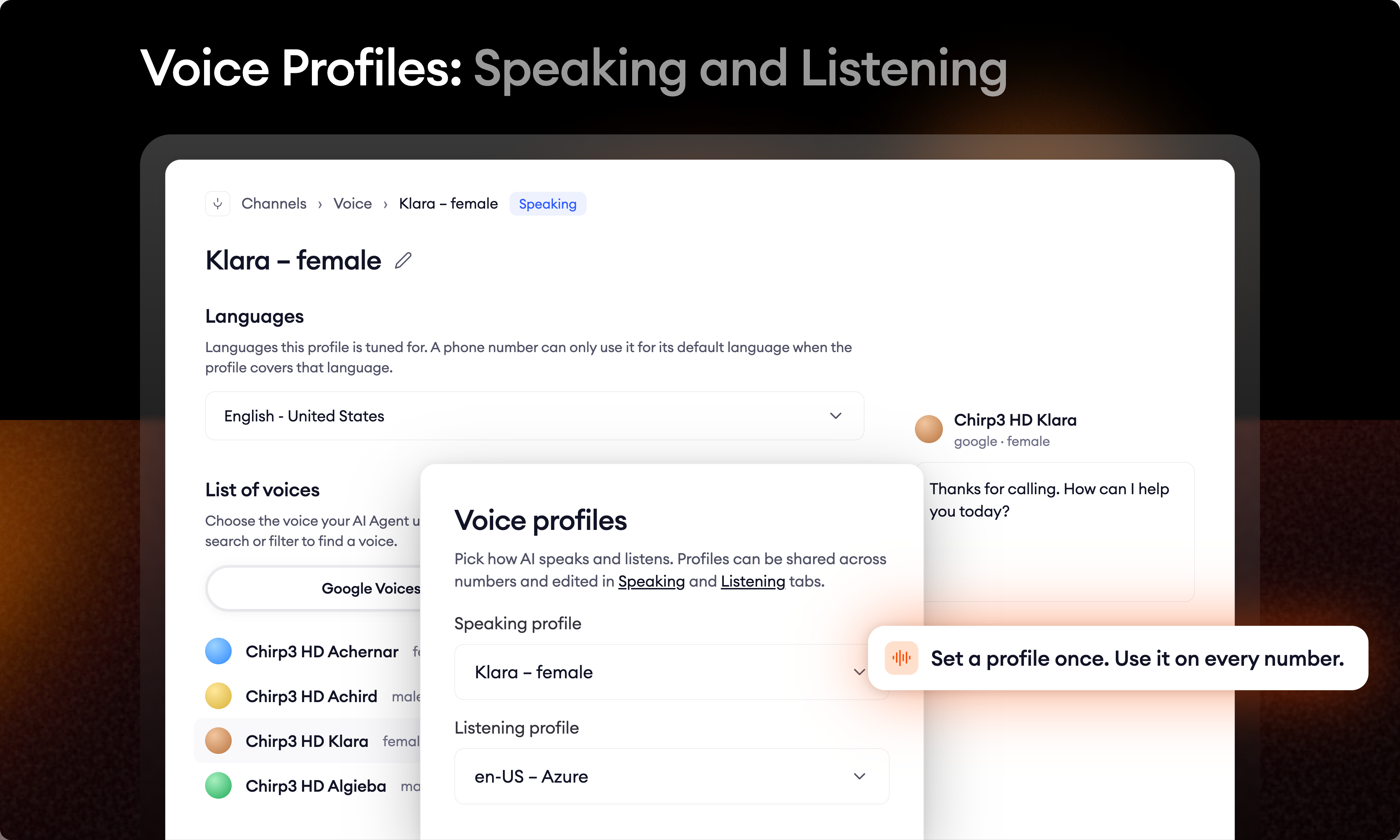
A customer says your brand name. The AI Agent mishears it. You add a priority phrase to that number and the problem is fixed. On that number. The other nine lines serving the same market still hear it wrong, and you will find out one incident at a time. That is the cost of every phone number carrying its own full voice configuration. Ten numbers meant setting the voice, the speed, the speech recognition provider, the priority phrases and the post-process replacements ten times, then keeping them in sync by hand.
Voice profiles replace that. You build a profile once and assign it to as many numbers as you like. Every number needs two:
- A speaking profile: everything about how your AI Agent sounds (text-to-speech).
- A listening profile: everything about how your AI Agent hears (speech recognition).
What's in a speaking profile
- The voice itself. Browse and preview the available Google and ElevenLabs voices
- Speed, Stability, Similarity boost, Volume
- Custom vocabulary: pronunciations for brand names, product names and anything the AI Agent otherwise says wrong
- Background audio: additional audio the AI Agent plays during the call
What's in a listening profile
- Speech recognition provider
- Listening sensitivity and the end-of-speech timeouts, including a separate one for data gathering
- Priority phrases: the words and phrases you want recognised more reliably
- Post-process replacements: corrections applied to what the AI Agent heard
- Provider-specific controls such as Minimum confidence threshold, Denoiser and Endpointing sensitivity
- Touch-tone input: let callers answer by pressing keys on their keypad
What this changes day to day
One place to fix something, everywhere. The misheard brand name now gets one priority phrase, added to the listening profile those numbers share. Every number on that profile picks it up. The same applies to post-process replacements and to pronunciations in custom vocabulary.
Numbers that should behave the same way now share one configuration. Not two copies that drifted apart.
Fewer steps to launch a number. Adding a number in a market you already serve is now picking two profiles from a list, not re-entering a full voice configuration.
Where to find it
Voice profiles live under Automate → Voice, in the Speaking and Listening tabs. You create, edit and delete profiles there. A profile that is still assigned to a phone number can't be deleted.
Migrating your existing setup
You don't need to do anything to keep your numbers running. Each number keeps the configuration it had.
- Every number gets its own pair of profiles. We lift each phone number's configuration out into a speaking profile and a listening profile, named after the number they came from, and point the number at its new pair.
- Identical profiles are consolidated. If several numbers had identical settings, the second step merges their profiles into one, reassigns the numbers to it, and names it after its contents rather than a phone number.
Why your profile list is worth a review
Any difference between two numbers keeps them on separate profiles, whether or not the difference was intentional. In practice, many of those differences weren't. A priority phrase added to one number during an incident and never added to its siblings. A post-process replacement rolled out to three of five numbers. A speaking rate nudged once and never put back. Each of those leaves you with two profiles where you almost certainly meant to have one. After the migration, go through your profile list and ask, for each pair that looks like it should be one:
- Is this difference deliberate, or is it drift?
- If it's drift, which version do you actually want?
Where the answer is drift, point the affected numbers at the profile you want and delete the other. You end up with a small set of profiles that is easier to reason about, and from then on, keeping it that way is automatic.
Stop leaving your processes to probability
See how Flows and Decision Engine guarantee that every step of your process runs exactly as designed.